Your artwork. Print-ready
in seconds.
Upload any reference photo or drawing. StencilIQ converts it into a professional tattoo stencil — full scene, tonal mapping, ready to transfer.
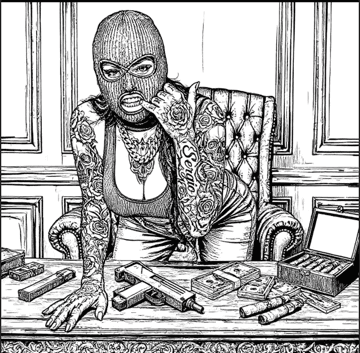

Drag to compare · Real AI output
How it works
Three steps to a print-ready stencil
Upload
Drop in any photo, Procreate export, scanned sketch, or reference image.
Convert
AI converts in seconds. Balanced for thermal printers. Detailed for full tonal crosshatch mapping.
Set tattoo dimensions, mirror for transfer paper, export PNG, PDF, or print directly.
Real output
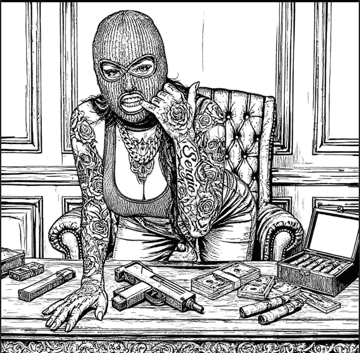
Photo in. Stencil out. Every detail preserved.
Black & Gray Realism
Detailed Mode
Clean Thermal Output
Balanced Mode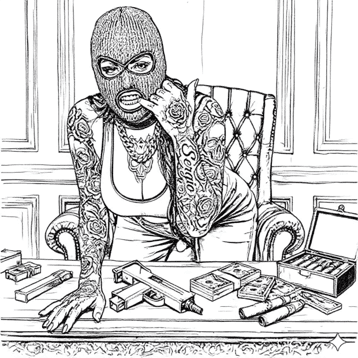
Full scene conversion — figure, background, tonal gradients.
Built for artists
From upload to transfer paper
Mirror Mode
Flips horizontally for thermal paper transfer. Applied to export, not just preview.
Custom Sizing
Wrist to Back Piece presets. Exact dimensions in inches or cm.
PNG · PDF · Print
Full-res PNG for Photoshop and Procreate. Print-ready PDF. iOS AirPrint supported.
Side-by-side Preview
Original and stencil live next to each other before you commit to printing.
Early access
Be first in the studio.
StencilIQ is invite-only during beta. Drop your email and we'll reach out when your spot is ready.